
Checkout Nokia N8 vs iPhone 4 Camera comparison
Checkout Nokia N8 vs Apple iPhone GamingPrice
One of the biggest advantage of Nokia N8 over the iPhone 4 is the price. With the price tag of €370 euros before taxes and subsidies, and converting it to pounds would give us £300. Comparing to the iPhone 4 (unlocked) 16GB with a price of £499 and £599 for 32GB. Therefore making the Nokia N8 much cheaper for a smartphone with cool multimedia features and especially Symbian^3 os.
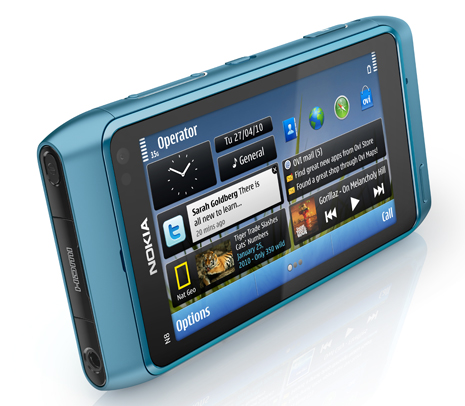
DesignWe admit that the iPhone 4 is slimmer, but there are consequences on this, like on the camera performance e.g. zooming and sensor size. For the color variants of Nokia N8, the mass is already have a wide choice for their taste on the color. There are currently 5 anodized casing for N8 the dark grey, silver white, green, blue and orange For the iPhone 4, there are two the white and the black (no pun intended) and obviously I don’t like that my phone is mistakenly identified by others as an iPhone 3GS or iPod touch.
Video Call
The limitations of Apple facetime for the Wi-Fi connection and iPhone to iPhone is what Nokia already solved and made possible long time ago to their devices. So in N8 you will not be bounded by connections and you will get connected for the video calls in any capable devices.
HDMI + Dolby Surround
Another one few specs that a 2010 smartphone have is the HDMI connection where you can connect to your home theatre. With HD TV you will get a crisp and clear visual treatment as well as with your sound with the Dolby Digital Plus.
Memory
The Nokia N8 has a 16GB internal storage plus giving you a chance to add an external hot swappable microSD card up to 32GB.
USB On-the-Go
If 48GB of storage is not enough for you then consider this USB on-the-go feature where you can read and make slave USB sticks from external hard drive like on this 250GB hdd.
Usability (Reception issue)
If you’re afraid to get a bad reception just because of the phone’s inability to not allow you to have a proper grip, well, isn’t that obvious that this could be one of the biggest mistake that Cupertino company made? Eventhough Nokia N8 isn’t launched yet, we all know that this Finnish giant have more than 1 billion of devices out there and we never have the incidents where people protests just because of the reception issue.
Sensor
To have the biggest camera sensor in the field of camera phones—and even bigger than the other p&s cameras—means that we are having the right innovations. By the size of the N8 and to its one of a kind features, it really shows that this is an advance feature that Nokia N8 will hold against competitors.
Xenon flash
It is still a strong advert of manufacturers that LED flash can provide you enough light for taking pictures. But it is still a fact that xenon flash are the one who leads in the technology of flash for compact cameras as well as to mobile phones. What Nokia did is they reduced the size of the flash to 30% less compare to Nokia N82 & without losing the power.
Editing software & Ovi Maps are free (Symbian^3)
If you’re phone has an HD capable video recording and Symbian^3 on N8 has an on-board video editor and without pulling some extra bucks from your pocket, of course. The same on Ovi Maps, neither we need a connection nor we would pay for it. That is really the magic of Nokia, bringing us connected anywhere and anytime.
Obviously, we are not biased on posting articles nor we are against iPhone 4 to prove if just check Norman’s article about reasons why he shouldn’t wait for Nokia N8.
Dimensions
- Size: 113.5 x 59 x 12.9 mm
- Weight (with battery): 135 g
- Volume: 86 cc
Display and user interface
- Screen size: 3.5"
- Resolution: 16:9 nHD (640 x 360 pixels) AMOLED
- 16.7 million colours
- Capacitive touch screen
- Orientation sensor (Accelerometer)
- Compass (Magnetometer)
- Proximity sensor
- Ambient light detector

Keys and input methods
- Physical keys (Menu key, Power key, Lock key, volume keys, Camera key)
- Finger touch support for text input and UI control
- On-screen alphanumeric keypad and full keyboard
- Dedicated camera and volume keys
- Possibility to use capacitive stylus
- Handwriting recognition for Chinese
Colours
Anodized aluminium casing, available in:
- Silver white
- Dark grey
- Orange
- Blue
- Green
- Colour availability varies by country
Personalisation
Up to three customisable home screens:
- Widgets
- Themes
- Shortcuts
- Icons
- Menu
- Customisable profiles
- Ring tones: mp3, AAC, eAAC, eAAC+, WMA, AMR-NB, AMR-WB
- Video ring tones
Themes
- wallpapers
- screensavers
- audio themes
- pre-installed themes
- changeable colour themes
Power Management
- BL-4D 1200 mAh Li-Ion battery
Talk-time (maximum):
- GSM 720 mins
- WCDMA 350 mins
Standby time (maximum):
- GSM 390 h
- WCDMA 400 h
- Video playback time (H.264 720p, 30 fps, maximum): 6 h (via HDMI to TV)
- Video recording time (H.264 720p, 25 fps, maximum): 3 h 20 mins
- Video call time (maximum): 160 mins
- Internal memory: 16 GB music playback time (offline mode, maximum): 50 h
Memory
- Internal memory: 16 GB
- MicroSD memory card slot, hot swappable, up to 32 GB
Operating Frequency
- GSM/EDGE 850/900/1800/1900
- WCDMA 850/900/1700/1900/2100
- Automatic switching between WCDMA & GSM bands
- Flight mode
Data Network
- GPRS/EDGE class B, multislot class 33
- HSDPA Cat9, maximum speed up to 10.2 Mbps, HSUPA Cat5 2.0 Mbps
- WLAN IEEE802.11 b/g/n
- TCP/IP support
- Capability to serve as data modem
- Support for MS Outlook synchronisation of contacts, calendar and notes
Connectivity
- Bluetooth 3.0
- HDMI
- 2mm Charging connector
- Micro USB connector and charging
- High-Speed USB 2.0 (micro USB connector)
- USB On-the-Go
- 3.5 mm AV connector
- FM Radio
- FM Transmitter
Software platform & user interface
- Symbian ^3 for Nokia
- Java MIDP 2.1
- Qt 4.6.2, Web Runtime 7.2
- HTML 4.1
- Software updates Over the Air (FOTA) & Over the internet (FOTI)
- Flash Lite 4.0
- OMA DM 1.2, OMA Client provisioning 1.1
Applications
- Key applications: Calendar, Contacts, music player, internet, messaging, photos, Ovi Store, Maps, Videos, WebTV, Office document editors, Video & photo editor, Mail, Chat, Radio
- PC Applications: Nokia Ovi Suite, Nokia Ovi Player
Personal Information Management (PIM)
- Detailed contact information
- Calendar
- To-do list
- Notes
- Recorder
- Calculator
- Clock
Email and messaging
- Easy-to-use email client with attachment support for images, videos, music and documents .doc, .xls, .ppt, .pdf, .zip
- HTML support for email
- Unified email client for multiple protocols: Yahoo!®
Mail, Gmail™, Windows Live™, Hotmail and other
popular POP/IMAP services, Mail for Exchange, IBM Lotus traveler - Editing of key office documents
- Email web widget for home screen
- Chat instant messaging support: OVI Chat, Yahoo, AIM, Windows Live, Gtalk, MySpace*
- Unified MMS/SMS editor
- Conversational view for SMS
- Push email and expanded portal support available through Nokia Messaging for Email and Instant Messaging
Call management
- Contacts: advanced contacts database with support for multiple phone and e-mail details per entry with personal thumbnail pictures and video clips
- Speed dialling, voice dialling (speaker independent) and voice commands
- Logs of dialled, received and missed calls
- Conference calling
- Integrated hands-free speaker
- Video calling
Browsing and internet
- Full web browsing of real web pages
- Web browsing with touch control
- Supported markup languages: HTML, XHTML MP, WML, CSS
- Supported protocols: HTTP v1.1, WAP
- TCP/IP support
- Visual history, HTML and JavaScript support
- Flash Lite 4 will support a majority of Flash Player 10.1 content
- Nokia Mobile Search
- RSS reader
- Support for streaming video
GPS and navigation
- Integrated GPS, A-GPS receivers
- Ovi Maps with free car & pedestrian navigation
- Wi-Fi Positioning
- Compass and accelerometer for correct orientation of display
- Use Nokia Ovi Suite to get the latest country maps for Ovi Maps on N8 for free
Camera
- 12 megapixel camera with Carl Zeiss optics
- Fullscreen 16:9 viewfinder with easy-to-use touchscreen parameters
- Xenon flash
- Face recognition software
- Autofocus
- Focal length: 5.9 mm
- F number/Aperture: F2.8
- Still images file format: JPEG/EXIF
- Zoom up to 2x (digital) for still images
- Zoom up to 3x (digital) for video
- Secondary camera for video calls (VGA, 640 x 480 pixels)
Image capture
- Automatic location tagging (Geotagging) of images and videos
- Images automatically taken in the correct orientation
- Pinch zoom in Photos image viewer
- View photos by tag cloud, month, album, slide show
- Photo editor
- Online Share with connectivity to popular sharing services
Other
- Internal memory: 16 GB
- MicroSD memory card slot, hot swappable, up to 32GB
- High-Speed microUSB to PC connectivity
Video cameras
- Main camera
- 12 megapixel with Carl Zeiss optics
- HD quality 720p resolution
- Shoot 16:9 videos in HD
- Video capture in 720p 25 fps with codecs H.264, MPEG-4
- Settings for scene, video light, white balance, colour tone
- Secondary camera VGA for video calls
- You can record high-definition video with Nokia N8. If you are recording video to a memory card, for the best performance, use fast, high-quality micro SD cards from known manufacturers. The recommended micro SD card Class is 4 (32Mbit/s (4MB/s)) or higher.
- Main camera
Video codecs & formats
- H.264 (base profile, main profile, high profile), MPEG-4, VC-1, Sorenson Spark, Real video 10
- Streaming: H.264, Flash Lite 4 (Flash 10 compatibility for video), On2 VP6, Sorenson Spark
Video sharing and playback
- HD 720p Video playback on HD TV through HDMI cable
- *Dolby Digital Plus surround sound when played with HDMI & a home theatre
- Support for download, streaming, and progressive download
- Video editing software
- Videos application: collection of stored videos
- On demand WebTV widgets to watch local & global internet streaming TV
- Support for Flash video
- YouTube browsing and streaming
- Video call support (WCDMA network services)
Music features
- Flick scroll to browse the albums in your music collection
- Comes with Music service on selected markets
- Nokia Music Player
- Ovi Music store
- MP3, WMA, AAC, eAAC, eAAC+, AMR-NB, AMR-WB, E-AC-3, AC-3
- Bit rate up to 320 kbps
- DRM support WM DRM, OMA DRM 2.0
- FM transmitter
Radio
- Stereo FM radio (87.5-108 MHz/76-90 MHz)
Gaming
- Use the touch UI to play games
- Dedicated graphics processor with OpenGL 2.0 enables 3D graphics
- Java games
- Use the accelerometer to play games
Energy efficiency
- Power Save mode, ambient light sensor, unplug charger reminder, Nokia Compact Travel Charger AC-15
Materials
- Free of PVC, free of nickel on the product surface, free of brominated & chlorinated compounds and free of antimony trioxide as defined in Nokia Substance List
Packaging
- Made of renewable, 100 % recyclable
Eco content and services
- Available at Ovi, maps for route optimization and pedestrian navigation
Recycling
- All materials of the device can be recovered as materials and energy
User guide
- Interactive user help in device and online, only Quick Guide in the box, eco tips on Green Page Full Eco declaration
Standard Sales Package
- Nokia N8 mobile computer
- Nokia Battery BL-4D
- Nokia Connectivity Cable CA-179
- Nokia Stereo Headset WH-701
- Nokia Compact Travel Charger AC-15
- Nokia Adapter Cable for HDMI CA-156
- Nokia Adapter Cable for USB OTG CA-157
- Quick start guide
Recommended accessories
- Nokia Bluetooth Stereo Headset BH-905
- Nokia Bluetooth Stereo Headset BH-505
- Nokia Bluetooth Headset BH-608
- Nokia Extra Power DC-11
- Nokia Stylus SU-36


